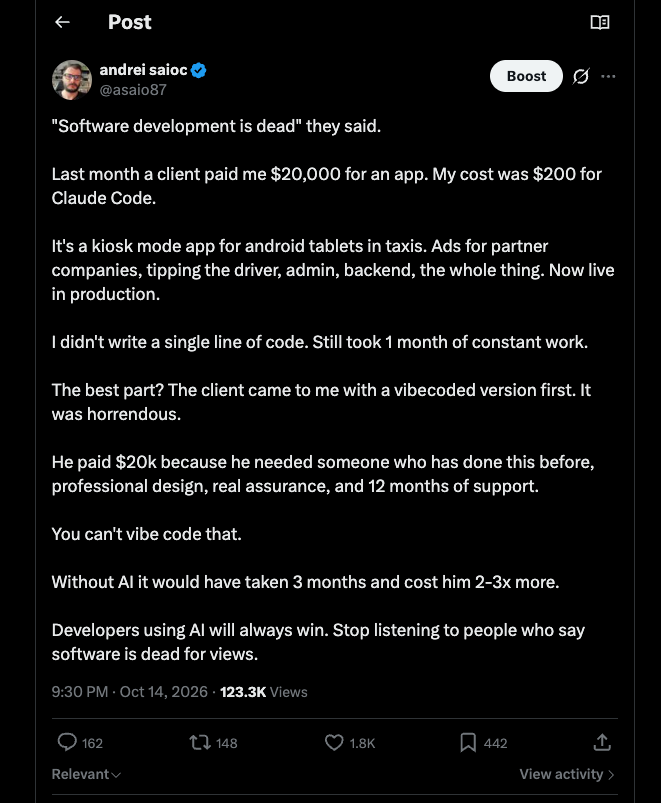
A post I wrote on X got 123K views and brought in leads for my agency. Yes I have an agency where I do development with AI, and also SEO & GEO. I didn’t pay for a single one of those views, and the post got a few leads as well. And several of my social media posts blew up and got actual paying customers with people paying me $1.5k – $5k per month per customer for SEO & GEO work I do for their websites.
I am telling you: organic social media is the bomb these days. Dont do paid ads, yet, do organic social media, its the best.
That’s the reason social media is worth your time as a business owner: it’s the only marketing channel where a good idea can outperform a big budget.
It doesn’t matter much whether you sell lattes, a SaaS product or an iOS app. The method is the same, and it’s not complicated. I wrote up the technical version with the full n8n automation for people who want to build it. This one is for everyone else.
Why social media is the cheapest customer you’ll ever get
Paid ads charge you for every click, forever. Stop paying, and the customers stop coming. A good organic post works differently. It keeps getting shared, it builds an audience you own, and next month’s post starts from a bigger base than this month’s.
The catch is consistency. Most small businesses post enthusiastically for two weeks, get 40 likes, and quietly stop. The businesses that win on social aren’t the most creative ones. They’re the ones still posting in month six. So everything below is designed around one goal: making it easy enough that you don’t quit.
The method, in plain English
Ride a conversation that’s already happening
Going viral is mostly about timing. Every week, people in your space are arguing about something. When I did this, the topic on X was “software is dead.” I didn’t start that conversation. I joined it with my own take, and my business was mentioned in passing.
For a coffee shop, the conversation might be “$7 lattes are a scam” or the latest TikTok drink trend. For an app, it’s whatever your users are complaining about this month. You show up with a real opinion, and your product is just there in the background. If the post reads like an ad, people scroll. If it reads like someone with an opinion who happens to run a business, they engage.
And yes you have to adjust your prompt, we dont want to copy posts, but we do want to copy the message that’s going viral. And tie it somehow to your business or app or website.
Learn what your audience already likes
Look at your past posts. Which ones got the most views or comments in the first 12 hours? Those are your proof of what works for your audience. Then save five or ten posts from other accounts in your niche that are doing big numbers right now. You’re not copying them. You’re studying why they spread: the first line, the angle, the slight controversy.
Again the prompt is key here, to not make duplicate posts. I think you can adjust manually these posts and in time adjust your prompts to make perfect posts out of the first try.
Let AI write drafts, in your voice
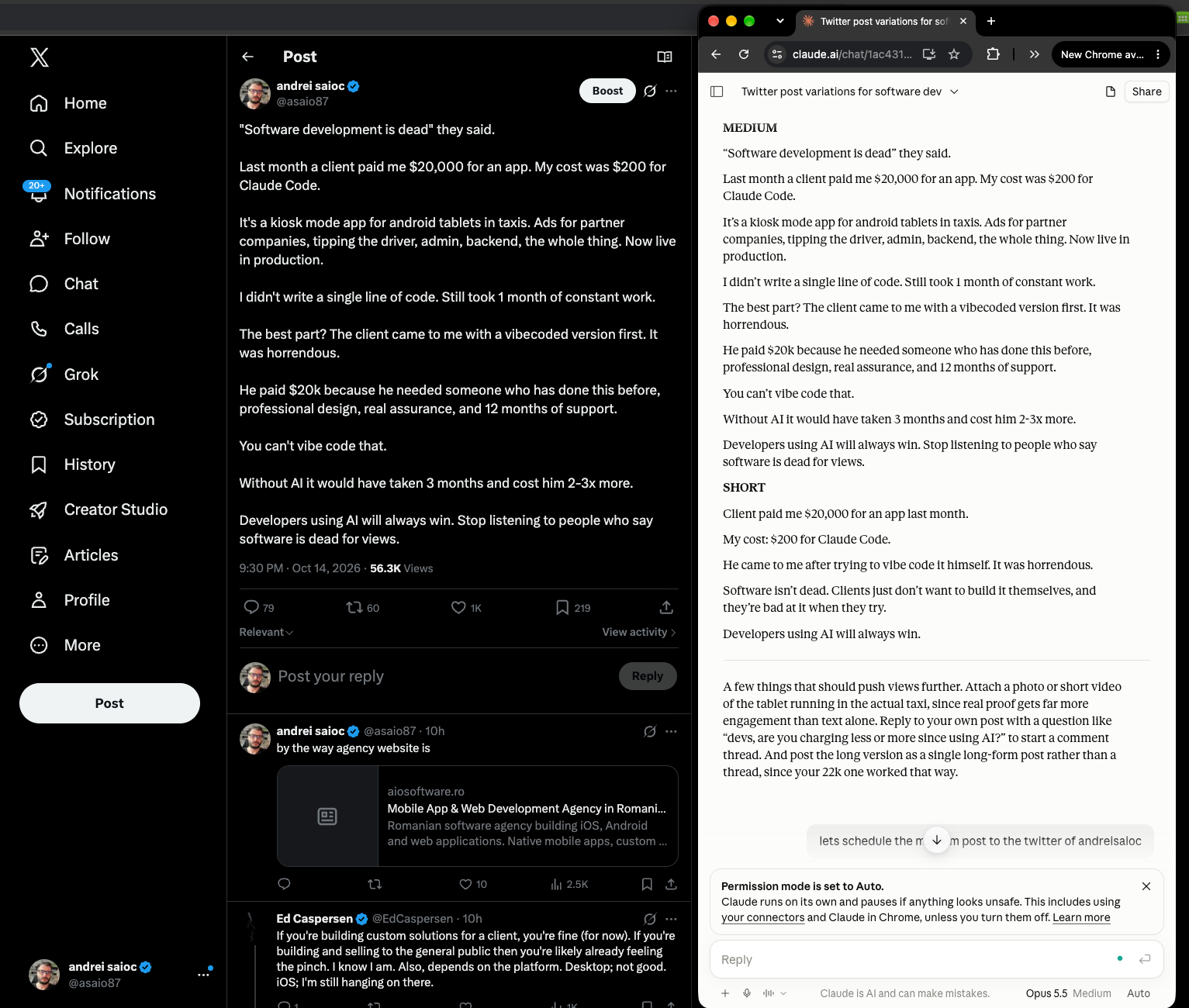
This is where most owners get stuck, because writing posts every day is a second job. So don’t. Give Claude your best posts and the trending ones, and ask it to write new posts that sound like you, on the trend, with a subtle mention of your business. You get three versions (short, medium and a thread) and pick the one you like.
The important instruction is “don’t make it sound more polished than me.” Customers can smell corporate copy. A coffee shop owner who writes in lowercase with one emoji should keep sounding like that. The exact prompt I use is in the tutorial, ready to copy.
Schedule a week at a time, not a post at a time
Sit down once a week, generate the posts, approve the good ones and schedule them all. That’s an hour on Sunday instead of a daily “what do I post today” panic.
I built SchedPilot for exactly this, so take the recommendation with that in mind. You connect your accounts once (Instagram, TikTok, Facebook, LinkedIn, X, Threads and more), and every post goes to all of them from one calendar. The part that saves the most time is the MCP connection (here’s how the other social media schedulers that work with Claude compare): you link SchedPilot to Claude, and then you can just say “schedule the medium version to Instagram and Facebook every weekday at 8am this week” in the same chat where you wrote the posts. No copy-pasting between apps, no logging into five platforms.
Check what worked, and do more of it
Every week, look at which posts took off. Add the winners to your “best posts” pile so next week’s drafts learn from them. Expect most posts to do okay and a few to flop. That’s normal. You’re looking for the one in ten that breaks out, and you only find it by posting the other nine.
What this looks like for different businesses
A coffee shop lives on Instagram and TikTok, and locally, Facebook still matters more than people admit. Your edge is that you’re a real place with real people. Opinions on coffee trends, behind-the-counter moments and the regulars (with permission) beat polished product shots. Text posts with a photo from your phone work fine. A realistic goal is being the café locals mention when a friend asks for a recommendation.
A website or online service usually does best on LinkedIn and X, where people talk about work and money. Share what you’ve learned building the business, including mistakes, numbers and opinions about your industry. That’s how my agency posts brought in leads: nobody asked for a pitch, but people who agreed with the take looked at who wrote it.
An iOS app has the hardest job and the biggest upside, since one viral TikTok can mean thousands of downloads overnight. Show the problem your app solves, not the app itself. “I was tired of losing receipts so I built this” beats a feature list every time. Post on TikTok and Instagram Reels for reach, and X or Threads for the build-in-public crowd who’ll share it.
Three questions that shape your plan
Before you start, answer these honestly. They decide where you put your time.
What does your app (or business) do, and who is it for? Write it in one sentence, and make the audience specific. “A budgeting app for freelancers who hate spreadsheets” gives you a niche, a pain point and a list of conversations to join. “A finance app for everyone” gives you nothing to say. The audience also picks your platforms: freelancers and founders are on X and LinkedIn, students and Gen Z on TikTok, local customers on Instagram and Facebook.
Is it already launched or still in development? If you’re still building, you’re in the best position you’ll ever be in, and most people waste it. Start posting now about the problem and your progress. Collect a waitlist. By launch day you want a few hundred people who’ve watched you build it and want it to succeed. If you’re already launched, skip the backstory and focus on results: customer stories, before-and-after, “here’s what changed after 1,000 users.” Either way, start this week. The algorithm doesn’t care how finished your product is.
What’s your marketing budget? Less than you’d think matters here.
- $0 to $50 a month: this whole method works. A Claude subscription plus a scheduler like SchedPilot (from $21 a month billed yearly) covers it. Your real investment is an hour a week.
- $100 to $500 a month: same method, plus a small ad budget to boost the posts that are already doing well organically. Only boost winners. Paying to promote a post nobody liked is how ad budgets disappear.
- More than $500: add a freelancer for short videos or graphics, since visual content is usually the bottleneck for apps and cafés. Keep writing and approving the posts yourself, though. Your voice is the asset.
Hang out where your customers already hang out
Before you write a single post, figure out where your customers spend their time online. This is the step most people skip, and it’s why they end up posting into the void on a platform their buyers never open.
For apps and websites, the answer is often a community rather than a big feed. A subreddit like r/freelance or r/productivity, a Facebook group for local parents, a Discord server for indie hackers, a niche forum where hobbyists have been talking for fifteen years. These places are smaller than TikTok, but everyone there already cares about your topic. One genuinely helpful answer in the right thread can send you more paying users than a post with ten times the views.
The rule in communities is to show up as a person first. Answer questions, share what you’ve learned, join the arguments. Mention your product only when it actually solves someone’s problem, and read each group’s rules, because Reddit in particular will bury anything that smells like self-promotion. Pay attention to what people complain about while you’re there. Those complaints are your next posts.
If you run a physical business like a coffee shop, a salon or a restaurant, I’d skip the forums and bet on short-form video: TikTok, Instagram Reels and YouTube Shorts. Local customers find places by scrolling, and a 20-second clip of latte art or a chaotic Saturday rush does more than any caption. Film on your phone, keep it real, and post the same clip to all three. That last part is where a scheduler earns its keep: upload the video once in SchedPilot and it goes out to TikTok, Instagram and YouTube at the times you pick.
Don’t forget SEO (it’s slow, but it compounds)
Social media gets you spikes. Search gets you a steady stream of people who are already looking for what you sell, on Google and, more and more, inside ChatGPT, Claude and Perplexity. It runs in the background while you do everything else. Here’s the workflow I’d follow:
- Write bottom-of-the-funnel pages first. These target people ready to buy: “best coffee shop in [your neighborhood],” “[your app category] for [your audience],” “[your product] pricing.” Fewer searches, but the visitors convert.
- Add alternative and comparison pages. “[Big competitor] alternatives” and “[you] vs [competitor]” catch people who are unhappy with what they use now. Be honest in them, including where the competitor is better.
- Write listicles. “7 best [tools/cafés/apps] for [use case],” with yourself on the list. These rank well and get cited by AI assistants constantly.
- Then go top of the funnel, written for LLMs as much as for Google. Clear, factual guides that answer the questions your customers ask before they know you exist. AI assistants pull from pages that give straight answers with real numbers, so write like you’re explaining it to a smart friend, not stuffing keywords.
- List yourself in directories for backlinks. Product Hunt, G2, Capterra, AlternativeTo and niche directories for software; Google Business Profile, Yelp and local listings for physical businesses. Each one is a link and a place you can be found.
- Be patient. Expect three to six months before most pages pull real traffic. The people who win at SEO are, again, the ones who don’t quit.
Your social posts and your SEO pages feed each other, too. A thread that does well on X is often a guide waiting to be written, and every guide gives you a week of posts to schedule.
If you’d rather have someone do this for you, SEO and GEO (getting your business recommended by AI assistants) is a big part of what my agency does. Email me at andreisaioc@gmail.com or find me on X at @asaio87 if you really want help with it.
Start smaller than you think
Pick one platform, the one where your customers already are. Run the method for two weeks: find the trend, generate drafts, approve, schedule, review. If it works there, add a second platform and post the same content with small tweaks.
SchedPilot has a 7-day free trial on every plan, which is enough to schedule your first full week and see if the routine sticks. If you or someone on your team wants to automate it further, the n8n tutorial shows how to turn the weekly hour into a five-minute approval on your phone.