
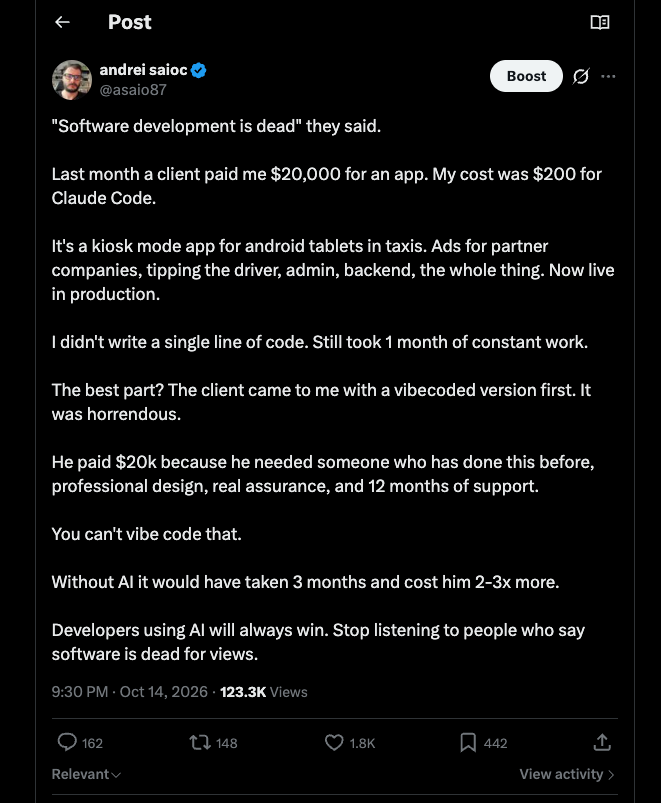
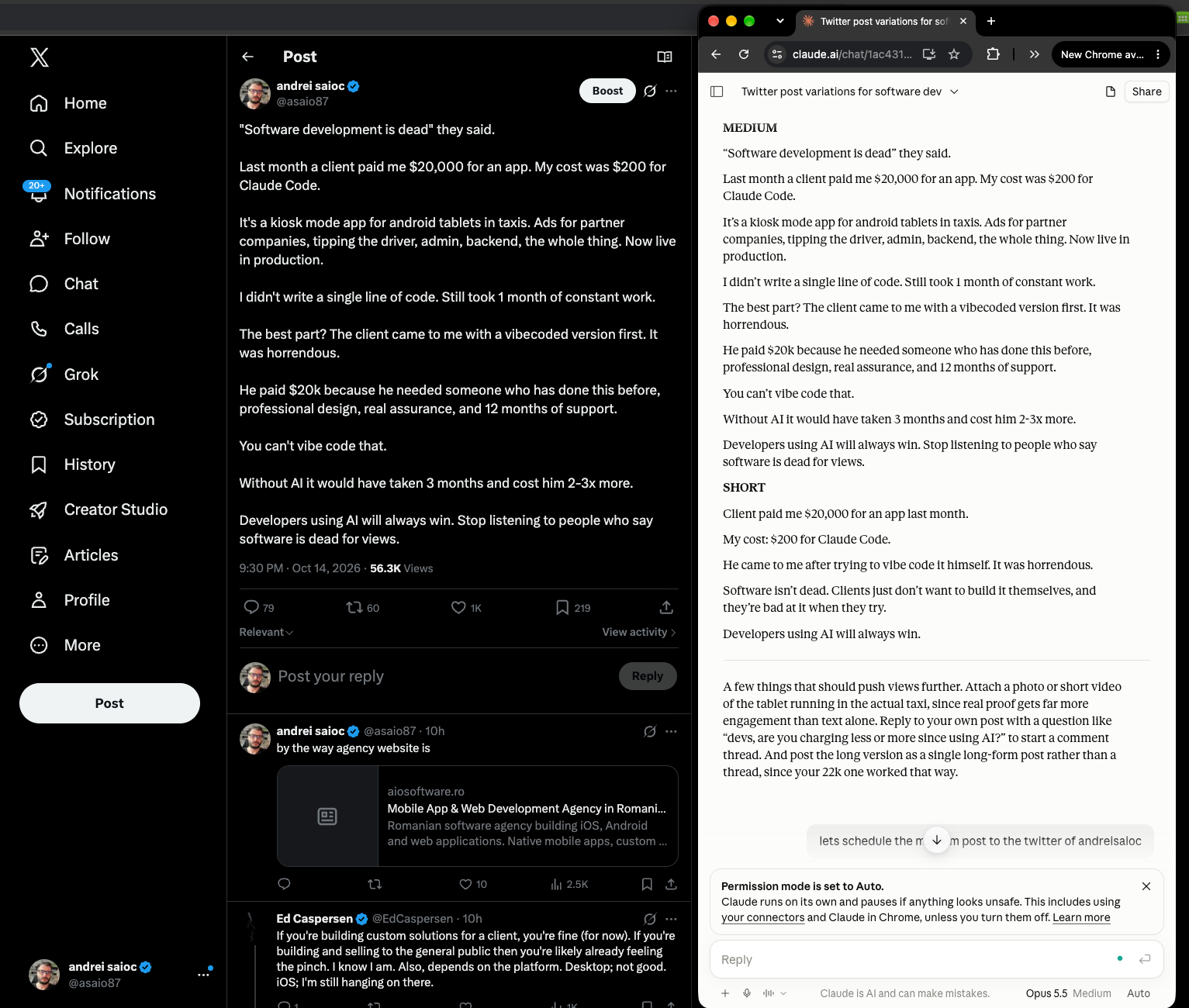
One of my posts on X hit 115K views. I didn’t write it from scratch, and I didn’t schedule it by hand. Claude wrote it in my voice, I picked the best version, and it got scheduled straight from the chat. Across the posts I’ve run through this process, views have added up to 115K.
The “secret” if i can say so, its to post as many times as possible, humanly make sense, smart posts (not garbage).
LE: the post has now 128K views
Below is the workflow, first the manual version (which is where you should start) and then the n8n version that runs it on autopilot every morning.
The manual workflow that got 128K views
As of time of writing this blog post, my social media post did 128k views in just 2-3 days. Being on twitter that will die to that, but i already got thousands of websites visits to my agency. And already 10 leads and most likely lurkers in the background. And other b2b lurkers which will contact me in 6 -12 months based on that post. Or not, but the idea is that you always have to do these posts to increase your chances.
1. Find a trend you can ride. Scroll your niche on X and look for one idea showing up over and over in high-view posts. When I did this, it was “software is dead.” Your goal is a post that clearly belongs to the trend but quietly mentions your business, app or service. Subtle is the word. If it reads like an ad, it dies.
2. Collect what already works. Write your best posts by hand for a while and check which ones perform in the first 12 hours. That’s your voice dataset. Also save posts from other people in the trend that are pulling big numbers.
3. Give both sets to Claude and ask for variations in your voice. This is the prompt I used, word for word:
I'm going to share two sets of X (Twitter) posts:

1. MY POSTS. These are posts I wrote. The ones marked as top performers got around 10-22k views. Study them closely for my voice: word choice, sentence length, punctuation, emoji use, line breaks, how I open, and how I end.

2. TRENDING POSTS. These are popular posts currently riding the "software is dead" trend on X. Study what makes them spread: the hook, the angle, the tension, and the format.

YOUR TASK:
Write a new post that fits the "software is dead" trend and is built to beat my 22k-view posts.

Requirements:
- It must sound like I wrote it. Match my voice, tone, and style exactly. Don't make it more polished or "AI-sounding" than my originals.
- Take a fresh angle on the trend. Don't copy any trending post; find a take that feels like mine.
- Open with a strong hook in the first line, since that's what stops the scroll.
- Build curiosity or mild controversy that invites replies and quote posts.
- End with something that drives engagement (a question, a bold claim, or a punchline), in the way I usually end posts.
- No hashtags unless I use them in my own posts.

Give me 3 versions:
- SHORT: one punchy line or two (under 280 characters)
- MEDIUM: 3-6 lines, single post
- LONG: a thread of 4-7 posts, numbered

After the three versions, add 1-2 sentences explaining which one you think will perform best and why.

--- MY POSTS (top performers marked with *) ---
[paste here]

--- TRENDING "SOFTWARE IS DEAD" POSTS ---
[paste here]
The “don’t make it more polished than my originals” line does a lot of work. Without it, you get posts that sound like a LinkedIn press release.
4. Pick the winner and schedule it from the chat. Read all three versions, pick one (or merge two), and schedule it to X, Threads, LinkedIn, Facebook or wherever using the SchedPilot MCP connector. Once it’s connected to Claude, you just say “schedule the medium version to my X and Threads accounts tomorrow at 9am” and it’s done. No copy-pasting into five tabs.
5. Repeat for 5 to 10 accounts. If you run several accounts (personal, company, product), do the same for each and adjust the prompt to include what you’re promoting. In my case I worked my agency services into the post.
A warning, because nobody says this part: most posts won’t pop. Some flop completely. You have to test formats, swap hooks and fiddle with the prompt until it clicks.
Turning it into an n8n workflow
Doing this by hand for one account is fine. For ten accounts, every day, it gets old. (If you’re still picking a platform for this, I compared the best AI automation tools, n8n included.) So I moved the repetitive parts into n8n and kept myself in the loop for the one step that matters: approving what goes out.
The workflow has six nodes:
- Schedule Trigger, every weekday at 7:30
- Google Sheets, reading your top posts and this week’s trending posts
- Anthropic (Claude), running the prompt above
- Slack or Telegram “Send and wait for response,” so you approve or reject
- HTTP Request to the SchedPilot API, scheduling the approved post
- A second branch, 12 hours later, pulling analytics back into the sheet
Step 1: Keep your inputs in a Google Sheet
Make a sheet with two tabs. “My posts” has columns for the post text, views and a top-performer flag. “Trending” has posts you’ve saved from other people this week. You could pull trending posts from the X API automatically, but search access there is expensive, and honestly, spending ten minutes a week hand-picking trending posts gives better results than scraping. You’re choosing what’s worth imitating.
In n8n, add a Google Sheets node for each tab, then an Aggregate node that joins the rows into two text blocks: myPosts and trendingPosts.
Step 2: Have Claude write the drafts
Add the Anthropic node (or the Basic LLM Chain with an Anthropic chat model) and paste in the prompt from above. Replace the two [paste here] placeholders with the expressions {{ $json.myPosts }} and {{ $json.trendingPosts }}. Change “software is dead” to whatever trend you’re riding that week. I keep the trend name in a cell of the sheet so I can update it without touching the workflow.
One tweak for automation: ask Claude to return JSON with short, medium, long and recommendation fields. It makes the next steps much easier to wire up.
Step 3: Approve before anything goes live
Don’t skip this. Fully automatic posting is how accounts end up publishing something embarrassing at 3am. Use the Slack or Telegram node with the “Send and wait for response” operation and send yourself the three versions plus Claude’s recommendation, with buttons for each version and a reject option. The workflow pauses until you tap one. On my phone this takes about 30 seconds over coffee.
Step 4: Schedule it through the SchedPilot API
Grab an API key from app.schedpilot.com/api-access (it starts with smm_). Run a quick GET request to https://api.schedpilot.com/developers/v1/accounts once to get the IDs of your connected accounts.
Then add an HTTP Request node:
Method: POST
URL: https://api.schedpilot.com/developers/v1/post
Header: X-API-KEY = smm_your_key_here
Body (JSON):
{
  "content": "{{ $json.approvedPost }}",
  "date": "{{ $now.plus(1, 'day').toFormat('yyyy-MM-dd') }}",
  "time": "09:00",
  "timezone": "Europe/Bucharest",
  "accounts": [
    { "id": 12, "type": "twitter" },
    { "id": 31, "type": "threads" },
    { "id": 17, "type": "linkedin" }
  ]
}
A 202 Accepted response means it’s queued. Swap in your own account IDs and timezone. If you’re running this for several brands, put the account IDs in the sheet too and loop over them, adjusting the prompt per brand.
Step 5: Feed results back in
This is what makes the system get better over time. Add a Wait node of 12 hours after scheduling (or a separate daily workflow), call the Post Analytics endpoint, and write the views back into the “My posts” tab. Anything that beats your current top performers gets the star. Tomorrow’s prompt now has a better voice dataset than today’s. After a few weeks, Claude is imitating your best posts, not just your average ones.
This particular post was created using Claude itself, there is no better proof than this.
Where to start depends on what you make
The workflow above is built for X, but the same structure works elsewhere with some changes. Three questions decide how you set it up.
Which platforms do you focus on? X, Threads and LinkedIn are the easiest to automate because text alone performs. Run the same approved post to all three, or ask Claude for a LinkedIn rewrite since LinkedIn rewards longer, more personal posts. Instagram, TikTok and YouTube need media, so the text is only the caption and the real work is the visual. SchedPilot’s API handles all of them; you’d upload the image or video first with the Upload Media endpoint and attach its ID to the post.
What kind of content do you make? If you write, this workflow is basically ready to copy. If you make graphics, add a step that fills a Canva or Placid template with the post text, then upload the image. If you make long videos, the bottleneck isn’t posting at all. It’s cutting the video into short clips, and that’s a different problem.
What should you automate first? Scheduling, nearly always. It’s the step with the most repetition and the least risk, and it’s the one this post covers. Clipping comes second for video creators; tools like Opus Clip can feed finished clips into the same n8n workflow, which then schedules them. DMs come last, and I’d be careful there. Most platforms restrict automated DMs, and a bot that messages people at scale is the fastest way to get an account limited. Automate the replies you’d copy-paste anyway, and keep real conversations human.
If you’d like to set this up and aren’t sure where to begin, try the manual version for one week first. Five days of posts, written with the prompt, scheduled through the SchedPilot free trial. Once you know which posts work for you, the n8n part is just removing the copy-paste.