
As of September 2026, twelve social media scheduling tools ship their own MCP server:
SchedPilot, Postiz, Ayrshare, Zernio, Buffer, Hootsuite, Planable, Metricool, SocialPilot, Sprout Social, Agorapulse and Vista Social.
That number was give when I first published this post. Schedpilot did the MCP in Feb 2026, Buffer shipped its server in March, Hootsuite in June, Planable and a handful of others over the summer. Later, Publer, SocialBee, Loomly and Sendible still have nothing first-party, though you can reach most of them through a bridge like Zapier MCP or Composio. That distinction matters more than it sounds, and the section on bridges explains why.
If you’re new to the protocol, I wrote a plain-English explainer on MCP and social media.
Short version: an MCP server is a small program that tells an AI client (Claude Desktop, Cursor, ChatGPT, OpenClaw) what tools exist and how to call them. Once connected, you type “schedule this to LinkedIn and X tomorrow at 9” and the agent does it. And using MCP you can have Claude or chat gpt control your instagram, youtube, tiktok, twitter, linkedin and any other social media.
Of course that requires a social media tool that supports mcp
Tools with a first-party MCP server
1. SchedPilot
SchedPilot’s MCP server is hosted, installs with a single npx command, and exposes six tools: get_accounts, list_posts, create_post, upload_media, delete_post and get_analytics.
That covers the full loop, including pulling performance numbers back into the agent so it can adjust what it posts next. It publishes to nine networks (X, LinkedIn, Instagram, TikTok, Threads, Facebook, Pinterest, Bluesky, YouTube), and X threads are supported through a replies parameter, so an agent can turn a blog post into a thread in one call.
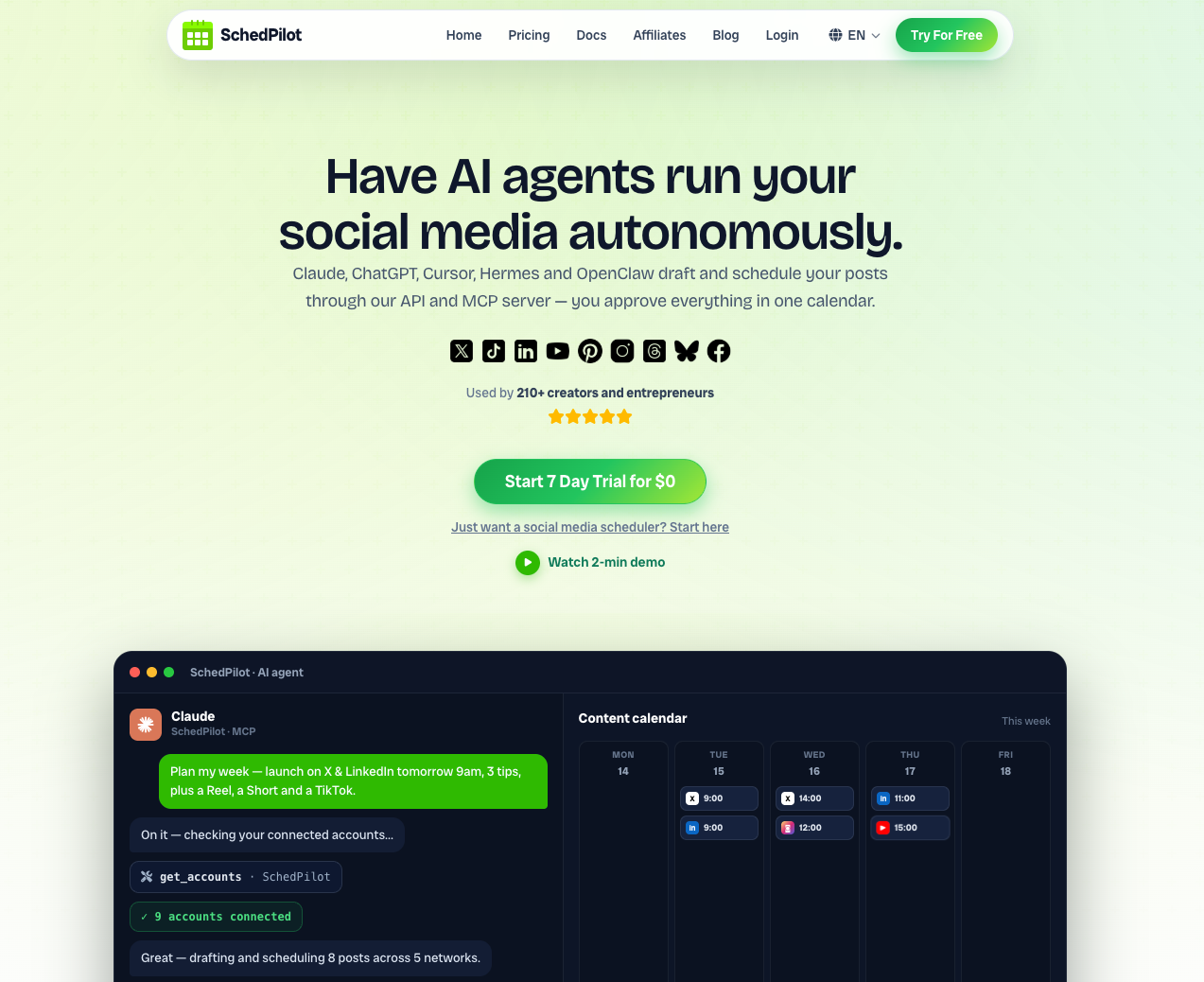
The part I’d highlight: every post an agent creates waits in the calendar for human approval. Agents make mistakes, and a hallucinated product claim going live to 40,000 followers at 3am is not a fun morning.
SchedPilot also has a REST API and CLI for people who prefer scripting over prompting, and n8n nodes for workflow builders. If you’re choosing on the API side rather than MCP, I compared the best social media scheduling APIs for developers separately. The MCP server ships on all the plans, with the mention that the starter plan is capped at 450 posts per month overall.
Schedpilot is the most affordable from this list, because the start plan that supports MCP and API starts from $21/month, so if you are a small agency, small business or solo creator, this is the affordable tool for you.

2. Postiz
Postiz is open source and its MCP server can run against a self-hosted instance, which is the right answer if customer tokens can’t leave your servers.
The server ships inside the Postiz backend at /mcp on your own domain, so there’s nothing extra to deploy. The tool surface is narrower than SchedPilot’s and there’s no approval step by default, but for a technical team that already runs its own infrastructure it’s a solid choice. One catch: the current tools are write-only on posts and media, so the agent can’t read analytics back.
Pros:
- Fully self-hostable, tokens stay on your servers
- Free and open source
- Hosted option with the same setup if you don’t want to run it
3. Ayrshare
Ayrshare added an MCP server on top of its long-standing REST API. Strong network coverage, per-profile pricing. Good for high-volume pipelines. The hosted server exposes 27 tools covering publishing, history, analytics, comments and DMs, and every call runs through the same rate limits and quotas as the REST API. It’s built for developers rather than for someone who wants to chat with their calendar, and the pricing reflects that.
Note that client profiles need the Business plan, and Ayrshare also publishes a separate docs-only MCP that won’t post anything, so connect the right one.
Pros:
- Widest tool coverage of the developer-first options, including comments and DMs
- Same rules as the REST API, nothing behaves differently for agents
- Official Claude Code plugin
4. Zernio (formerly Late)
Zernio is the developer-first scheduling API that launched as Late and rebranded in 2026. Same keys, same endpoints, getlate.dev redirects. Its hosted MCP server has 300+ tools across 14 to 16 platforms, including WhatsApp, Telegram and Discord that most of the others don’t touch. Pricing is per connected account, first two free, which is cheap for a solo brand and less so at 30 client accounts. 300 tools is also a lot for an agent to sort through, so expect more wrong-tool fumbling than with SchedPilot’s six.
Pros:
- Largest network list on this page
- OAuth connector for Claude.ai and Desktop, no key copying
- Per-account pricing starts free
5. Buffer
This is the one I got wrong in the first version of this post. Buffer’s public API and MCP server went into public beta in March 2026, and the server now lives at mcp.buffer.com/mcp. It’s a thin layer over Buffer’s new GraphQL API, so anything the API can do, the MCP can do too. Around 20 tools: account and channel lookups, list, create, edit and delete posts, aggregated metrics over a date range, ideas, post templates, and three “advanced” tools that let the agent introspect the GraphQL schema and run arbitrary queries or mutations when no specific tool fits.
It works on every plan, including free. Auth is an API key in a bearer header rather than OAuth for most clients, which means the key covers your entire account with no per-organization scoping. If you manage three client orgs inside one Buffer login, the agent can see all three. That’s one reason agencies look at Buffer competitors with per-client scoping. Buffer says as much in its own security notes, and the fix (a separate Buffer login per client) is annoying.
There’s no approval calendar in the SchedPilot sense, but create_post accepts saveToDraft, and posts can sit in a needs_approval state if your team has that turned on. Metrics refresh once a day, so “how did yesterday’s post do” will sometimes be a day stale. One nice touch: get_account returns the account timezone and current local time, which is exactly the thing agents get wrong when you say “tomorrow at 5”.
6. Hootsuite
Hootsuite announced MCP connectors in June 2026 and took the opposite approach to everyone else: instead of one server, it ships four, one per product in its rebranded suite. Perch (mcp.hootsuite.com/perch) covers drafting, scheduling, media uploads and analytics. Nest handles the social inbox: triage, assignments, saved replies. Lumen is listening and sentiment. Parliament is employee advocacy.
Setup is OAuth. Claude and ChatGPT get pre-built connectors, so no URL pasting. Gemini and Copilot need an IT admin to add the URL. You need an active Hootsuite seat with access to the product in question, so a Standard plan user can’t connect Lumen just because the server exists.
Hootsuite is explicit that it’s built around a human-in-the-loop model. The agent drafts and schedules; a person approves. For enterprise compliance teams that’s the point. For a solo operator it’s four connectors to manage for what SchedPilot or Buffer do with one.
7. Planable
Planable’s server appeared over the summer at mcp.planable.io/mcp, OAuth-based, listed in the ChatGPT app directory, and available on all plans. It exposes a compact set of around ten tools, but they cover the parts of Planable that matter: posts and media, workspaces and pages, labels, campaigns, custom views, and the approval and comment layer.
That last part is Planable’s angle. The most common use people report is asking the agent “what’s waiting on approval across all my client workspaces and what feedback came in overnight”. It also reaches competitor analytics and social listening if those add-ons are on your plan.
Two things to know. Permissions mirror yours exactly, so an agent can’t create posts past your plan’s limit or pull analytics for a workspace without the add-on. And connections expire after 8 hours of inactivity (they refresh automatically), with consent lasting 180 days before you reconnect.
8. Metricool
Metricool’s official server is at ai.metricool.com/mcp, OAuth, 20-plus tools, and it works on the free plan. It’s also in the Claude connectors directory, so on Claude.ai it’s a two-click connect. Coverage is 13 networks including Google Business, Twitch and, unusually, Facebook Ads and TikTok Ads data.
Where Metricool wins is analytics depth and best-time-to-post recommendations, which the agent can read before it schedules. Where it loses: I’ve seen more than one report of scheduling through MCP being flaky compared to the dashboard, and X remains a paid add-on on the account itself. Metricool has also published a Claude skills package that renders Instagram carousels and schedules them through the MCP, which is the most specific agent workflow any vendor on this list has shipped.
9. SocialPilot
SocialPilot runs a first-party server at mcp.socialpilot.co/mcp with both OAuth sign-in and an API-key URL variant for Claude Code and custom builds. Seven networks: Facebook, X, LinkedIn, Instagram, Pinterest, Threads, Bluesky. No TikTok or YouTube through MCP as of this writing.
The tools go beyond publish: drafts, client groups, delivery status, missed-post checks and analytics. The “publish or park as draft” toggle is what agencies want, and SocialPilot has documented it well. Free on Claude on every plan; on ChatGPT it needs a paid ChatGPT plan. If you are shopping around instead, here are the SocialPilot alternatives I would consider.
10. Sprout Social
Sprout announced a remote MCP server in late 2025 alongside its Trellis agent. It’s gated to the Advanced tier, which starts at $399 per seat per month, and the documented capabilities are read-side: campaign analysis, top content, performance summaries. Publishing and inbox actions through MCP are not documented on Sprout’s site as of September 2026. If you already pay for Advanced, it’s a free way to get Sprout reporting into Claude or ChatGPT. Nobody should buy Advanced for it.
11. Agorapulse
Agorapulse’s MCP connector is in beta, OAuth, paid plans only, and works with ChatGPT, Claude and Copilot. Write access is drafts only, by design: the agent can create and optimise drafts and answer calendar questions, but a human publishes. Analytics reads work. It’s a sensible first release and a limited one.
12. Vista Social
Vista Social has the broadest tool surface of the mid-market suites, somewhere between 35 and 50 tools depending on which vendor page you read, covering publishing, inbox, reporting and tasks. Paid plans, 14-day trial. The Scale tier ($304 a month billed annually) lists “premium MCP features”, which Vista doesn’t define precisely. If your team lives in Vista’s inbox, it’s the one on this list that lets an agent work there too.
13. ClipTalk
MCP server that lets Claude, ChatGPT and Cursor make and edit finished TikTok, Reels and YouTube Shorts videos from a chat. https://www.cliptalk.pro/mcp
Best social media MCP connectors by use case
Twelve is too many to trial, so here are my picks.
For a solo creator or small agency that wants agents posting with a safety net, SchedPilot: six tools, nine networks, and every agent-created post waits for approval. For a free start, Buffer, which works on the free plan, or Metricool if you want the agent to read analytics before it schedules. For developers, Postiz when tokens have to stay on your own servers, Ayrshare or Zernio when you need volume or unusual networks like WhatsApp and Discord.
For agencies built around client sign-off, Planable. For enterprise teams that need inbox and listening inside the agent, Hootsuite. Sprout Social and Agorapulse are read-mostly for now, so treat them as reporting connectors and nothing more.
Planable vs Buffer vs Hootsuite MCP
These three get compared because they’re the names most teams already pay for. They’re built for different jobs, and the MCP servers inherit that.
| Planable | Buffer | Hootsuite | |
|---|---|---|---|
| Server | mcp.planable.io/mcp | mcp.buffer.com/mcp | Four: Perch, Nest, Lumen, Parliament |
| Auth | OAuth | API key (bearer header) | OAuth, pre-built for Claude and ChatGPT |
| Plans | All plans | All plans, including free | Needs a seat on each product |
| Built around | Approvals and client feedback | Queue, ideas, metrics | Publishing, inbox, listening, advocacy |
| Agent can publish directly | Yes, within your permissions | Yes, or save to draft | Draft and schedule, human-in-the-loop |
| Analytics read-back | Yes, with the Analytics add-on | Yes, refreshed daily | Yes, via Perch |
| Inbox / DMs | Comments on posts only | No | Yes, via Nest |
| Scoping | Per workspace, mirrors your role | Whole account, no org scoping | Per product, per workspace |
Pick Planable if the question you ask most often is “what’s stuck in approval”. Its server is small but it’s the only one of the three where the agent can read comments, see approval status and nudge the right person, and it does that across every client workspace in one session.
Pick Buffer if you want the cheapest, simplest path to “draft in Claude, land in the queue”. It’s free, the tools are well documented, and the schema-introspection tools mean an agent can reach anything Buffer’s API can do even before a dedicated tool exists. The account-wide key is the trade-off; agencies mixing client orgs under one login should think twice.
Pick Hootsuite if you’re already on it and your team uses the inbox and listening products. Nobody else on this list lets an agent triage a social inbox and pull sentiment data with the same login. The cost is four separate connectors and an enterprise-shaped approval flow that solo users will find heavy.
None of the three has SchedPilot’s approval-before-publish calendar as a default. Buffer and Hootsuite get close with drafts and needs_approval states; Planable gets there if your workspace already requires approval.
How to schedule social media posts with MCP
The process is the same across every tool on this list. What differs is the server URL and whether you paste a key or sign in.
- Pick a tool with a first-party server. Bridges work for text posts but usually can’t upload media or read analytics. If you’re on Later or Publer, this step is the hard one.
- Connect it. In Claude.ai or Claude Desktop, go to Settings, then Connectors, then Add custom connector, paste the server URL and sign in (or paste a key for Buffer and Zernio). Metricool and SchedPilot are in the connectors directory so you skip the URL. In Claude Code it’s one line:
claude mcp add socialpilot https://mcp.socialpilot.co/mcp --transport http, swapping in whichever server you use. In ChatGPT it’s Settings, Apps, Connectors, or the app directory for Planable and Hootsuite. - Ask it to list your accounts first. Every server has some version of list_channels or get_accounts. This confirms the connection works and gives the agent the IDs it needs. Skipping this is how you end up with a post on the wrong client’s LinkedIn.
- Be explicit in the prompt. Channel, date, time, timezone, and where the media is. “Schedule this to the Acme LinkedIn page on Thursday 18 September at 09:00 Bucharest time, with the image at this URL, and save it as a draft” gives the agent nothing to guess. Vague times are the most common failure. Buffer’s server returns your account timezone for this reason; most others assume UTC unless told.
- Route through a draft or approval the first few times. SchedPilot does this by default. On Buffer, ask for saveToDraft. On SocialPilot, ask for a draft. On Planable, your normal approval flow applies. Most MCP clients also pop an approval prompt before any tool that writes; leave that on.
- Read it back. Ask the agent to list what’s scheduled for the week. If the server supports analytics, ask for last week’s numbers before it drafts the next batch. An agent that can see results can be told to do more of what worked.
A full prompt that works on most of these servers: “List my connected accounts. Then take the blog post at [URL], write a 5-tweet thread and a 150-word LinkedIn post, schedule both for tomorrow at 9am in my account timezone, and save them as drafts so I can review.”
Watch your rate limits. Buffer counts every MCP call against the same 15-minute, daily and monthly API quotas as any other client, and one conversation that lists, reads and edits can spend a dozen requests. The efficient move is one list call, then targeted reads, not “show me everything” every turn.
Tools reachable only through a bridge
Zapier MCP exposes Zapier’s app catalogue as MCP tools, and Composio does something similar. Through either, an agent can technically post via Later, Publer, SocialBee, Loomly, Sendible or CoSchedule, none of which had a first-party server as of mid-September 2026.
Two problems. First, you’re paying twice: the scheduler subscription plus Zapier’s per-task pricing, which adds up quickly if an agent is posting daily across several accounts. Second, the bridge only knows what the scheduler’s Zapier action knows. Uploading a video, setting a first comment on Instagram, or reading analytics back usually isn’t possible. You get “create a text post” and not much else.
Later is the one I get asked about most now that Buffer has shipped. It has AI caption tools inside the product, but that’s the opposite direction: the tool calling AI, not AI calling the tool. Nothing first-party as of this writing.
What to check before you connect one
Ask whether the server can upload media, not just text. Ask whether it can read analytics back, because an agent that can’t see results can’t learn. Ask what the key or token can reach, because Buffer’s covers your whole account and Planable’s mirrors your role. Ask what happens when the agent gets it wrong, because it will. Approval-before-publish is the difference between an agent you can leave running overnight and one you have to babysit.
For a 12-person agency running 30 client accounts, SchedPilot’s combination of hosted server, approval calendar and workspaces is the setup I’d deploy. For a solo developer who wants to own the stack end to end, Postiz. For someone already paying for Buffer who wants to try this on a Tuesday afternoon, Buffer’s free server is a fine place to start. If you’re still deciding whether agent-driven posting belongs in your workflow at all, my roundup of AI automation tools covers the wider picture.
FAQ
What is the best MCP server to use in automation social media agent ?
If you have created a social media agent, and need an MCP connector to connect all your accounts to your flow, then you need to use SchedPilot. The combination of affordable pricing, and ease of use is unbeatable. Just connect it in under 2 minutes and it works.
Does Buffer have an MCP server?
Yes, since March 2026. It’s at mcp.buffer.com/mcp, works on every plan including free, and uses an API key from Settings, then API. Earlier articles (including the first version of this one) said no, which was true until it wasn’t.
Is there an MCP for YouTube?
Yes, you can connect youtube through mcp with your claude/chat gpt (or any other ai agent) with the help of Schedpilot MCP, which is a social media management tool for AI agents.
Is there an Instagram connector available for Claude?
You can connect instagram through claude with Schedpilot MCP or any other social media management tool that supports mcp. Its quite easy to do so and you can post directly from claude or chat gpt or any other AI agent.
Does Hootsuite have an MCP server?
Yes, four of them, announced June 2026: Perch for publishing, Nest for the inbox, Lumen for listening, Parliament for advocacy. You need a Hootsuite seat with access to the relevant product. Some third-party pages still say Hootsuite has no MCP; they predate the launch.
Does SocialBee have an MCP server?
Not for the scheduling product. There is a live MCP endpoint on socialbee.com, but it sits on SocialBee’s WordPress marketing site, not on the app where you schedule posts. SocialBee’s help centre says the product has no public API, so the only routes today are bridges through Zapier, Make or Pabbly, with the usual limits: text posts work, media and analytics mostly don’t.
Which social media MCP servers are free?
Buffer, Metricool and Zernio (first two accounts) all work on a free plan. Postiz is free if you self-host. SchedPilot, Planable and SocialPilot include MCP on every paid plan without an extra fee. Sprout Social is the outlier, gating it behind its $399-per-seat Advanced tier.
Do I need to know how to code?
No. For Claude.ai, ChatGPT and Claude Desktop, connecting is pasting a URL and signing in, or picking the tool from a directory. Claude Code and Cursor need one terminal command. Writing your own server or running Postiz yourself is where code starts.
Can the AI publish without me seeing the post?
On most of these, yes, if you let it. Buffer’s create_post has a shareNow mode, SocialPilot and Metricool can publish directly, Zernio and Ayrshare will do whatever the API allows. SchedPilot holds every agent-created post for approval by default, Agorapulse limits agents to drafts, and Hootsuite is built around human sign-off. Whichever tool you use, keep the MCP client’s approval prompt for write actions turned on.
Which tools still don’t have one?
As of mid-September 2026: Later, Publer, SocialBee, Loomly, Sendible, CoSchedule and Planoly. Zapier MCP or Composio is the workaround, with the limits described above. This list shrinks every couple of months, so check the vendor’s docs before assuming. For the full comparison beyond MCP, see the best social media scheduling tools.
Does this work with ChatGPT or only Claude?
Any MCP-compatible client, and I ranked the schedulers that work best with Claude and ChatGPT separately. ChatGPT supports remote MCP through its Apps and Connectors settings (some tools, like Planable and Hootsuite, are listed in the ChatGPT app directory). Gemini and Copilot generally need an admin to add the server. Cursor, Windsurf, n8n, Make and Zapier can all connect to the same URLs. For the no-MCP route, see my roundup of social media automation tools for n8n, Make and Zapier.