TL;DR
I ran the same two-week plan (34 posts across Instagram, LinkedIn, TikTok and a blog) through every content calendar tool on this list. The short version: SchedPilot is my first pick because the calendar actually publishes what you plan and your AI assistant can fill it for you. Planable is the one to buy if client sign-off is your daily headache. Buffer is enough for one person. Notion, ClickUp and Airtable are planning boards, and none of them will post anything on their own.
The 12 content calendar tools covered
- SchedPilot – content calendar plus publishing, with MCP and API for AI agents
- Planable – approvals and client review
- Buffer – the simple calendar for solo creators
- Later – visual planning for Instagram-first brands
- Loomly – post ideas and tidy approval flows
- SocialPilot – budget agency calendar with bulk upload
- Hootsuite – calendar, inbox and listening in one dashboard
- Sprout Social – for teams with a real budget
- CoSchedule – blog, email and social on one marketing calendar
- Notion – free-form editorial calendar
- ClickUp – content calendar inside a project manager
- Airtable – build your own content calendar app
A spreadsheet works fine as a content calendar until roughly the third week. Then somebody moves a row, the Thursday Reel goes out with Tuesday’s caption, and you find out from a client. That is usually the day people start searching for content calendar software. Or for content planning software, a content planner tool, a content scheduler. Vendors use all of those names for roughly the same product, so I treat them as one category here.
The problem is that “content calendar tool” means two very different products. Some are planning boards where you write down what should happen. Others are social media content calendars that publish the post when its date arrives. I have paid for both kinds, and I now think most small teams should skip the first kind entirely. More on that below.

What separates a good content calendar tool from a pretty one
Four things mattered in my testing. Does the calendar publish, or does it only remind you? Can you drag a post to another day without breaking it? Can someone who is not you (a client, a boss, a legal reviewer) approve a post without needing a 20-minute onboarding call? And can you sort content by category and format, so you can see at a glance that next week has five promos and zero educational posts?
That last one gets ignored a lot. A calendar that labels every slot with a category (tips, behind the scenes, promo) and a format (carousel, Reel, text) is what turns a list of dates into a plan. If you only want the scheduling side, I keep a separate ranking of the best social media scheduling tools.
Content calendar software comparison
Nine of these twelve are content calendar and scheduling software in one product. The other three are content planning tools that stop at the plan. Prices are the monthly-billing entry price I found when I last checked each pricing page.
| Tool | Publishes posts | Approvals | Starting price | Best for |
|---|---|---|---|---|
| SchedPilot | Yes | Yes | $21/mo | Small teams, agencies, AI-agent workflows |
| Planable | Yes | Yes, multi-level on Enterprise | Free for 50 posts, then $33 per workspace | Client review |
| Buffer | Yes | Basic | Free for 3 channels, then per channel | Solo creators |
| Later | Yes | On higher plans | $25/mo per social set | Instagram-first brands |
| Loomly | Yes | Yes | $65/mo | Brand teams |
| SocialPilot | Yes | Yes | About $25 to $30/mo | Agencies on a budget |
| Hootsuite | Yes | Higher plans only | $99/mo | Large teams |
| Sprout Social | Yes | Higher plans only | $200+ per seat | Enterprise reporting |
| CoSchedule | Yes | Suite plan | Free for 1 user, then about $29 per user | Blog plus social |
| Notion | No | Manual | Free, then about $10 per user | Editorial planning |
| ClickUp | No | Manual | Free, then $7 per user | Content as project tasks |
| Airtable | Only via Zapier or Make | Custom | Free, then about $20 to $24 per seat | Custom workflows |
12 best content calendar tools and software
1 SchedPilot
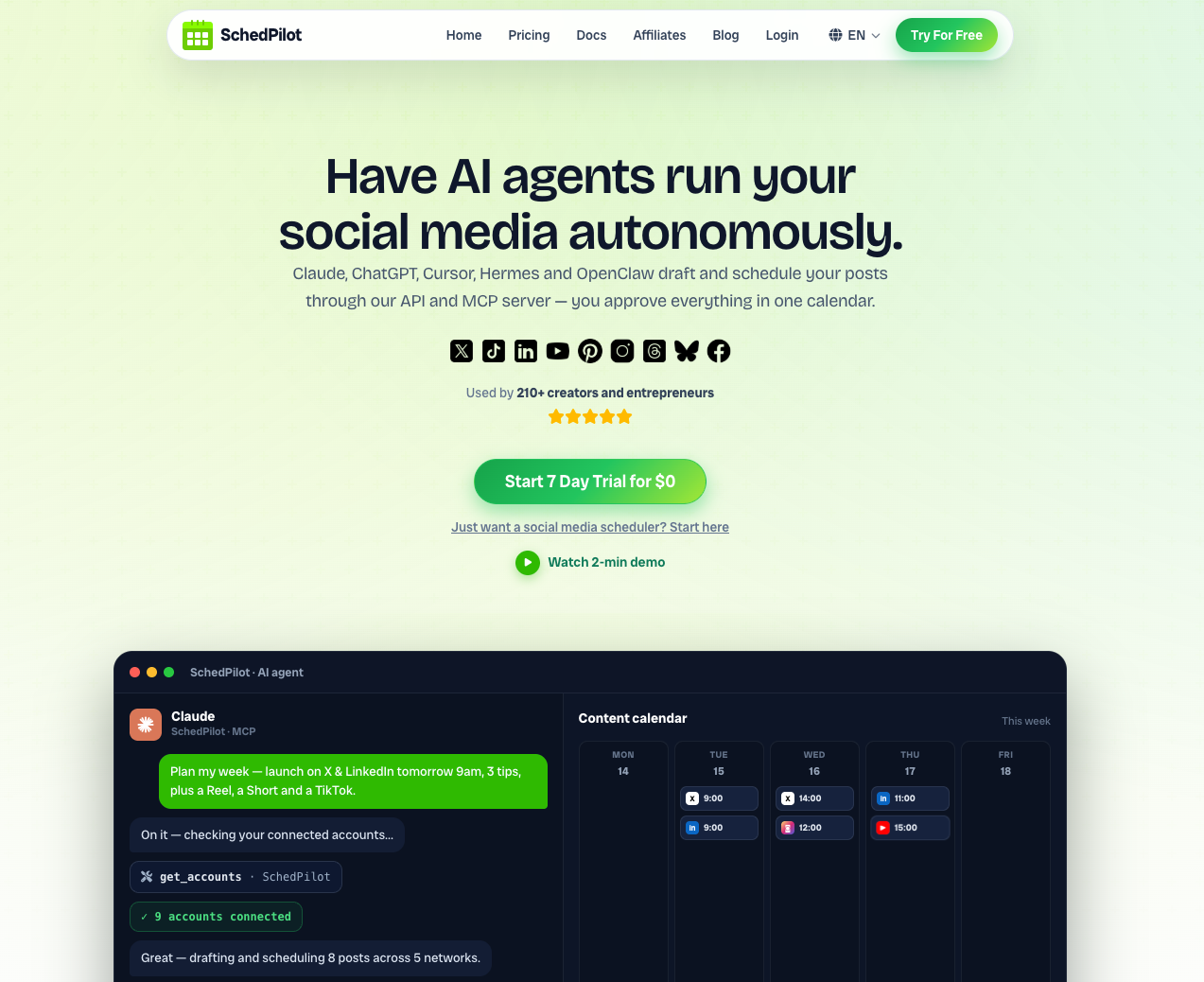
SchedPilot is the content calendar I use myself, so take the ranking with that in mind. The reason it sits first is practical. The calendar is the publishing queue. You drag a post onto Thursday at 9:00, and on Thursday at 9:00 it goes live on Instagram, TikTok, LinkedIn, Facebook, X or wherever you pointed it. There is no second step where you copy captions out of a planning doc into a scheduler. Posts live in a shared content library, drafts and approvals sit on the post itself, and you can filter the month by channel or campaign.
What none of the older tools here do well is work with AI assistants. SchedPilot ships with an MCP server and a public API, so you can ask Claude or ChatGPT to “plan next week: three tips, one promo, one behind-the-scenes, carousel on Monday and Wednesday” and the posts appear in your calendar as drafts for you to review. I filled my 34-post test plan this way in about 25 minutes, most of which was me rewriting hooks. If that sounds interesting, I wrote more about social media tools with MCP servers and about schedulers that work with Claude and ChatGPT. It also plugs into n8n, which I cover in my automation tools for n8n, Make and Zapier roundup.
The honest downside: it is a younger product, and the analytics are lighter than what Sprout Social gives you.
Pros
- One calendar that both plans and auto-publishes across all the major networks
- MCP server and API, so AI agents can draft and schedule a whole week for you
- Drag and drop rescheduling
- Drafts, approvals and a unified content library keep small teams out of email threads
- Best-time suggestions per channel
- Priced for small businesses and solo creators, not enterprise procurement
2 Planable
Planable has the best approval experience on this list, and I don’t think it is close. Comments sit directly on each post, clients can approve from the calendar, and if they refuse to create an account you send a guest link and they review without logging in. You get feed, calendar, grid and list views, and it publishes to nine channels including Threads and Google Business Profile.
The catch is the pricing structure. It is charged per workspace (Basic was $33 a month when I checked, with a 60-post cap), and the multi-level approvals that agencies actually want are on Enterprise. For a freelancer with six clients that adds up quickly.
Pros
- In-context comments and one-click client approvals
- Guest view links for clients who won’t sign up
- Grid view shows how the Instagram feed will look
- Free trial has no time limit (50 posts)
3 Buffer
Buffer is the calendar I recommend to people who say “I just want to see my week and have it post.” You set time slots per channel, drop posts in, and the calendar fills itself. The free plan covers three channels, which is enough for a personal brand. Pricing is per channel after that, so it stays cheap for one person and gets expensive around the tenth account.
Collaboration is thin. If you need more than a basic draft-and-approve flow, or a proper API, look at my list of Buffer and Hootsuite alternatives.
Pros
- Calm, clean interface you can learn in ten minutes
- Free plan with auto-publishing for three channels
- Queue-based slots keep a steady posting rhythm
- Decent built-in analytics and automated reports
4 Later
Later started as an Instagram planner and it still shows. The visual planner lets you drag photos from a media library onto the calendar and preview the grid before anything goes out, which matters if your feed is your storefront. It covers TikTok, Pinterest, Facebook and LinkedIn too, but those feel like guests in an Instagram house.
Pros
- Best grid preview for Instagram
- Media library with labels and notes
- Link in bio page included
5 Loomly
Loomly is a content calendar for brand teams that like process. Each post moves through states (draft, pending approval, approved, scheduled), and you see a realistic mockup of how it will render on each network before it ships. It also suggests post ideas from trending topics, date-based events and RSS feeds, which helps on the weeks when the calendar looks empty and nobody has an idea.
Pricing has crept up over the last two years. Starter is now $65 a month, or $49 if you pay for the year. It used to be the obvious budget pick and it no longer is.
Pros
- Clear approval states on every post
- Post mockups per network
- Idea prompts when you are stuck
- Handles ad drafts alongside organic posts
6 SocialPilot
SocialPilot is what agencies buy when Hootsuite’s quote arrives. The calendar is plain but functional, bulk upload takes a CSV of up to 500 posts, and client management with white-label reports is included on plans that start around $25 to $30 a month. The interface looks a few years behind. I stopped caring after a day because everything is where you expect it.
Pros
- Bulk scheduling by CSV
- Client approval without giving clients your login
- White-label reports
- Low price per connected account
7 Hootsuite
Hootsuite bundles a visual content calendar with a unified inbox, social listening streams and a bulk composer. If you manage 30 profiles and need to answer DMs from the same screen where you plan posts, it does the job. If you want a tool that combines content calendar, approvals, inbox and listening in one login, Hootsuite and Sprout Social are the two on this list that cover all four. Plans start at $99 a month, and approval workflows are reserved for the higher tiers, which is a strange thing to hold back from a tool sold to teams.
My opinion: most people under 10 accounts who buy Hootsuite are paying for a dashboard they use 20% of.
Pros
- Calendar, inbox and social listening in one place
- Bulk scheduling for high volumes
- Supports more networks than most
8 Sprout Social
Sprout Social has a good shared calendar with campaign tags, notes and per-network timing. But nobody buys Sprout for the calendar. They buy it for the reporting: competitor benchmarks, audience analysis and exports that a CMO will read. Pricing starts north of $200 per seat per month, and extra users cost almost as much as the first. If analytics is the real reason you are shopping, compare it against the options in my social media analytics tools comparison first.
Pros
- The deepest reporting on this list
- Campaign tagging across the whole calendar
- Optimal send times based on your own audience data
- 30-day free trial
9 CoSchedule
CoSchedule is the only tool here that treats blog posts, emails, podcasts and social posts as equal citizens on one marketing calendar. It hooks into WordPress, so an article and its eight promo posts move together when you drag the publish date. ReQueue refills empty slots with your best evergreen posts. There is a free calendar for one user, a Social Calendar plan at about $29 per user, and the approval workflows live in the more expensive Suite.
Pros
- Blog, email and social on a single editorial calendar
- WordPress integration
- ReQueue recycles evergreen content automatically
- Drag and drop rescheduling for whole campaigns
10 Notion
Notion makes a lovely editorial calendar. You create a database, add properties for status, channel, category, format and owner, then flip between calendar, board and table views. There are hundreds of free content calendar templates, and the free plan is fine for one person. Paid plans start around $10 per user.
It will never publish a post. Someone still has to copy the caption into Instagram on the day, and that someone will eventually forget. I use Notion for long-form planning (articles, video scripts) and keep social in a tool that posts.
Pros
- Completely flexible properties for category, format, owner, anything
- Huge template library
- Briefs and drafts live next to the calendar
- Generous free plan
11 ClickUp
ClickUp treats each piece of content as a task with subtasks, assignees, due dates and dependencies. The calendar view shows what is due, the timeline view shows where two launches collide, and proofing lets reviewers comment on images, PDFs and video. It has a free-forever plan and paid plans from $7 per user. Like Notion, it does not publish anything, and the settings menus are deep enough to lose an afternoon in.
Pros
- Best if content production involves many handoffs (writer, designer, editor)
- Proofing on images and video
- Social media calendar templates to start from
- Cheap per user
12 Airtable
Airtable is a database that you can dress up as a content calendar app. Calendar, kanban and gallery views sit on top of the same records, and automations can ping Slack when a status changes or request approval when a draft is ready. With Zapier or Make in the middle you can even push approved records out to social networks.
It took me most of a weekend to build something I was happy with. That is the trade: exactly the workflow you want, paid for with your own setup time. A free plan exists, and paid plans start around $20 to $24 per seat.
Pros
- Any field, any view, any workflow
- Built-in automations
- Good content calendar templates to fork
Visual content calendars
Some people plan in lists. Others need to see the month laid out with thumbnails before they can tell whether it works. If you are in the second group, the choice narrows fast.
Later is the most visual content planning software on this list. You drag images from the media library onto the calendar and check the Instagram grid before anything is scheduled. Planable gives you four views of the same plan (feed, calendar, grid, list), and the feed view shows each post the way it will render on the network, which is what clients want to look at anyway. Loomly does per-network mockups too. SchedPilot keeps it simpler: a drag and drop calendar you can filter by channel or campaign.
Notion and Airtable can look visual with a gallery view, but you are building that view yourself and nothing on it will publish. For visual social media calendar planning I would pick Later for Instagram-heavy brands, and Planable or SchedPilot for everyone else.
Content calendar tools for TikTok, YouTube and LinkedIn
Most calendar roundups quietly assume Instagram and Facebook. Check the other networks before you pay, because support is uneven.
With TikTok, ask whether the tool publishes the video itself or sends a reminder to your phone and leaves you to finish the job in the TikTok app. A reminder is a calendar entry with extra steps. SchedPilot, Buffer, Later, Planable and Hootsuite all connect to TikTok, and I go through how each one handles publishing in my list of the best TikTok schedulers.
SchedPilot, Buffer, Planable and Hootsuite also put YouTube on the same calendar, so one short video can be planned once and sent to both TikTok and Shorts. There is more on that in my roundup of YouTube Shorts and short-form video schedulers.
LinkedIn is covered by every publishing tool here. The detail to check is whether it posts to personal profiles as well as company pages, since founders usually get more reach from their own profile. My LinkedIn schedulers comparison lists who does what.
Content calendar tools for agencies
Agencies ask a question solo users never do: what happens to the bill when I add a client? That decides more than any feature.
Planable charges per workspace, and each client usually gets their own. Six clients on Basic is $198 a month before anyone asks for multi-level approvals. Later bills by social set (one profile per network), so two Instagram-only clients already need two sets. Sprout Social charges per seat at $200 and up, which is fine for an in-house team of three and painful for an agency of twelve. SocialPilot and SchedPilot are the two I would price first for a dozen clients.
As for what agencies actually use to manage client social media posts, it splits by where the pain is. Planable when the clients are the hard part and want to comment on every post. SocialPilot when volume is the hard part, because of the bulk CSV upload and white-label reports. SchedPilot when the team is small and wants an AI assistant drafting each client’s week. Sprout Social shows up at agencies whose clients pay for a monthly reporting deck.
Check one thing before you sign. Each client should sit in a separate calendar or workspace and only ever see their own. A shared calendar where one client can glimpse another client’s launch date is how agencies lose accounts.
Approvals, team comments and revision history
Once more than one person touches a post before it goes out, the calendar needs comments attached to the post, an approval step that blocks publishing until someone says yes, and a record of what changed.
Planable does the first two best. Comments appear next to the post in real time, and you can require approval before anything is scheduled. Approval chains with several reviewers in order (copywriter, then account manager, then client) are an Enterprise feature there, and Hootsuite and Sprout Social keep approvals on their higher tiers too. Loomly and SocialPilot include an approval step on their regular plans, and SchedPilot keeps drafts and approvals on the post itself. One approver is enough for most teams. I think a long approval chain is usually a sign that nobody trusts the brief.
Which brings up briefs. If you want the brief, the draft and the calendar entry in one place, the planning boards win. A Notion page or a ClickUp task holds the brief and the discussion around it, and CoSchedule attaches tasks to each calendar item. The publishing tools mostly assume the brief lives somewhere else.
Revision history is the weakest area across the board. Notion keeps page history and Airtable keeps a revision log on every record, so you can see who changed a caption and when. With the publishing tools, test it during the trial: edit a post that was already approved and see whether the approval resets. If it doesn’t, your approval step is decorative.
Editorial calendar software for blog, email and social
An editorial calendar holds more than social posts. Articles, newsletters, a podcast episode, the launch email. Four tools here handle that properly, and three of them don’t publish to social.
CoSchedule is the one built for it, and the closest thing on this list to content marketing calendar software. A blog post, its email and its promo posts sit on the same grid and move together. When someone asks me which marketing calendar tool to buy for a team that lives in WordPress, that is my answer. Notion is the best free editorial calendar app if writing is the main job, since the draft lives inside the calendar entry. ClickUp fits teams where an article passes through a writer, an editor and a designer with a due date on each handoff. Airtable is for people who want to design the workflow themselves.
The social-first tools (Buffer, Later, Planable, SchedPilot) can hold a placeholder for a blog post, but they won’t manage the article.
AI content calendar tools
Nearly every tool on this list now has an AI button in the composer. Buffer, Hootsuite, Later and Planable will all rewrite a caption or suggest hashtags. That saves a few minutes per post. It doesn’t plan anything.
AI content calendar planning means the assistant decides what goes on which day (the mix of categories, the formats, the spread across channels) and then puts drafts into the slots. Right now that needs a tool an assistant can write to, through an MCP server or an API. SchedPilot is the one I use for this. I give Claude the content pillars and the number of posts per week, and it fills the calendar with drafts tagged by category and format. Loomly’s idea prompts and CoSchedule’s ReQueue are older, rule-based answers to the same problem. They are useful for filling gaps, though neither writes a plan.
Automated content planning without AI works too. An Airtable automation or an n8n workflow can turn a row in a sheet into a scheduled post, as long as you are willing to maintain it.
Content calendar apps for planning on your phone
Buffer, Later, Hootsuite, Planable and Loomly have iOS and Android apps. So do Notion, ClickUp and Airtable. Buffer’s is the one I would hand to someone who plans mostly on mobile, because a queue of time slots fits a small screen and the free plan works in the app. Later’s app suits people who shoot on the phone and want the photo in the media library a minute later.
A month of content is miserable to plan on a six-inch screen in any of them, though. Plan on a laptop. Use the app for approving posts, fixing a typo, and moving Thursday’s post when something comes up.
ContentCal alternatives
ContentCal was the content calendar a lot of small teams learned on. Adobe bought it in December 2021 and closed it on March 31, 2023, moving a slimmer version into Adobe Express as Content Scheduler. People still search for it, mostly because they miss the post states and the approval flow. I go deeper in my full list of ContentCal alternatives.
Planable is the closest replacement for the approval side. Loomly’s draft, pending, approved and scheduled states feel the most like ContentCal’s old workflow. SchedPilot gives you the same plan, approve, publish loop for less money, with an AI assistant filling the drafts. And if your ContentCal calendar also held blog posts and emails, CoSchedule is the one that handles those natively.
Free and cheaper alternatives to expensive content calendar software
Hootsuite starts at $99 a month and Sprout Social at more than $200 per seat. Most of that money buys the inbox, listening and reporting. If what you need is a calendar that publishes and an approval step, you can spend far less.
Free first. Buffer’s free plan publishes to three channels, which makes it the best free content calendar app that actually posts. Notion, ClickUp and Airtable are free content planning apps for one person, CoSchedule has a free calendar for a single user, and Planable lets you run your first 50 posts without paying.
Under $50 a month, with a drag and drop calendar that publishes: SchedPilot from $21 with the MCP server and API included, Later at $25, SocialPilot around $25 to $30, CoSchedule’s Social Calendar at about $29 per user, and Planable Basic at $33 per workspace. Loomly used to belong in this group and at $65 it no longer does.
I have longer lists if you are leaving a specific tool: Buffer alternatives and SocialPilot alternatives. If budget is the main filter, I also ranked the best social media schedulers under $100 and the best scheduler for small businesses.
How I would choose
Start from one question: should the calendar press publish for you? If yes, cross off Notion, ClickUp and Airtable, however nice their templates look. Running a planning board next to a separate scheduler means every change has to be made twice, and the two will drift apart within a month. This is the position I mentioned at the top, and I hold it fairly firmly for teams under ten people. Larger content operations with writers, designers and legal review are different, and ClickUp or Airtable earn their place there.
After that it comes down to who else touches the calendar. Only you: Buffer or SchedPilot. You plus clients who need to approve: Planable, SchedPilot or SocialPilot. You plus an AI assistant doing the drafting: SchedPilot, because of the MCP server, or one of the social media scheduling APIs if you would rather build the pipeline yourself. A board of directors who want charts: Sprout Social. A SaaS marketing team that runs blog posts, launch emails and social from one plan: CoSchedule, with ClickUp as the workflow tool if the bottleneck is production and publishing is the easy part. If you are weighing the AI side of the older names, I compared Planable vs Buffer vs Hootsuite MCP servers in a separate post.
Whichever you pick, fill the first month with real posting times instead of round numbers. I have country-level data for Instagram, for example the best time to post on Instagram in Europe, and the wider numbers are in my social media statistics roundup. If you are still deciding which networks deserve a row in the calendar at all, read social media platforms brands should know before you commit to seven channels you can’t feed.
Content calendar software FAQs
What is the best content calendar tool in 2026?
For most small teams, agencies and solo creators I would pick SchedPilot, because planning and publishing happen in the same calendar and AI assistants can fill it through MCP. Planable is the better choice if multi-step client approvals are your main problem, and Buffer is enough if you work alone on two or three channels.
What’s the best content scheduling software for automatically assigning category, format, and daily post list?
Look for a tool that supports labels or categories on each post plus some form of automation. In SchedPilot you can have an AI assistant generate the daily post list through the MCP server, tagging each post with a category (tips, promo, story) and a format (carousel, Reel, text) before it lands in the calendar as a draft. Airtable can do the same with custom fields and automations, but it needs Zapier or Make to publish. Loomly and CoSchedule handle labels well but the assigning is manual.
What is the difference between a content calendar and a social media scheduler?
A content calendar shows what is planned and when. A scheduler publishes it. Notion, ClickUp and Airtable are calendars only. SchedPilot, Planable, Buffer, Later, Loomly, SocialPilot, Hootsuite, Sprout Social and CoSchedule do both.
Is there a free content calendar tool?
Yes. Buffer has a free plan with publishing for three channels. Notion, ClickUp and Airtable have free plans for planning. CoSchedule offers a free calendar for one user, and Planable’s free trial covers your first 50 posts with no time limit. A Google Sheets template also works for the first few weeks, right up until two people edit it at once.
How far ahead should I plan my content calendar?
Two to four weeks of scheduled posts is the range that works for most teams I have seen. Plan themes and campaigns a quarter ahead, write and schedule the actual posts two weeks ahead, and leave about 20% of slots open for things that happen in the news or in your business.
How do you integrate a content calendar into your social media workflow?
Use a free trial to load two real weeks of content instead of test posts. Set up categories and formats first, connect your channels, create a template for anything recurring (weekly tip, Friday promo), then invite whoever approves posts and have them approve one on day one. If they struggle with that first approval, pick a different tool.
What is the best content calendar app for planning on mobile?
Buffer. The queue layout works on a phone and the free plan includes the iOS and Android apps. Later is the better pick if most of your content is photos and video shot on that same phone. Planable and Hootsuite have apps too, and they are best used for approving and rescheduling.
Which tool combines content calendar, approvals, inbox and listening in one?
Hootsuite and Sprout Social. Both keep approvals on their higher plans, so check the tier before you sign. Under ten accounts, a cheaper calendar with approvals plus replying in the native apps usually costs a fraction of either.
What is the easiest tool to plan content in advance?
For one person, Buffer: set your time slots once and drop posts into the queue. If you would rather describe the week and have an AI assistant draft it into the calendar, SchedPilot is the easier route.
Which content calendar shows post performance next to the plan?
Buffer shows engagement numbers on each sent post in the same publishing view, which is enough to spot what worked last week. Sprout Social goes much further and ties its reports to the campaign tags you set in the calendar. None of these tools turns the calendar itself into a good analytics screen, so expect to click through to a report.
Can AI build my content calendar for me?
It can do the first draft. With a tool that exposes an MCP server or API, an assistant like Claude can propose a month of posts, assign formats and categories, and place them into the calendar as drafts. You still need to edit the hooks and check facts. I wrote about how this works in MCP and social media.